728x90
Database, Collection, Document를 생성하는 명령어와 제거하는 명령어
- Database, Collection, Document 관계도
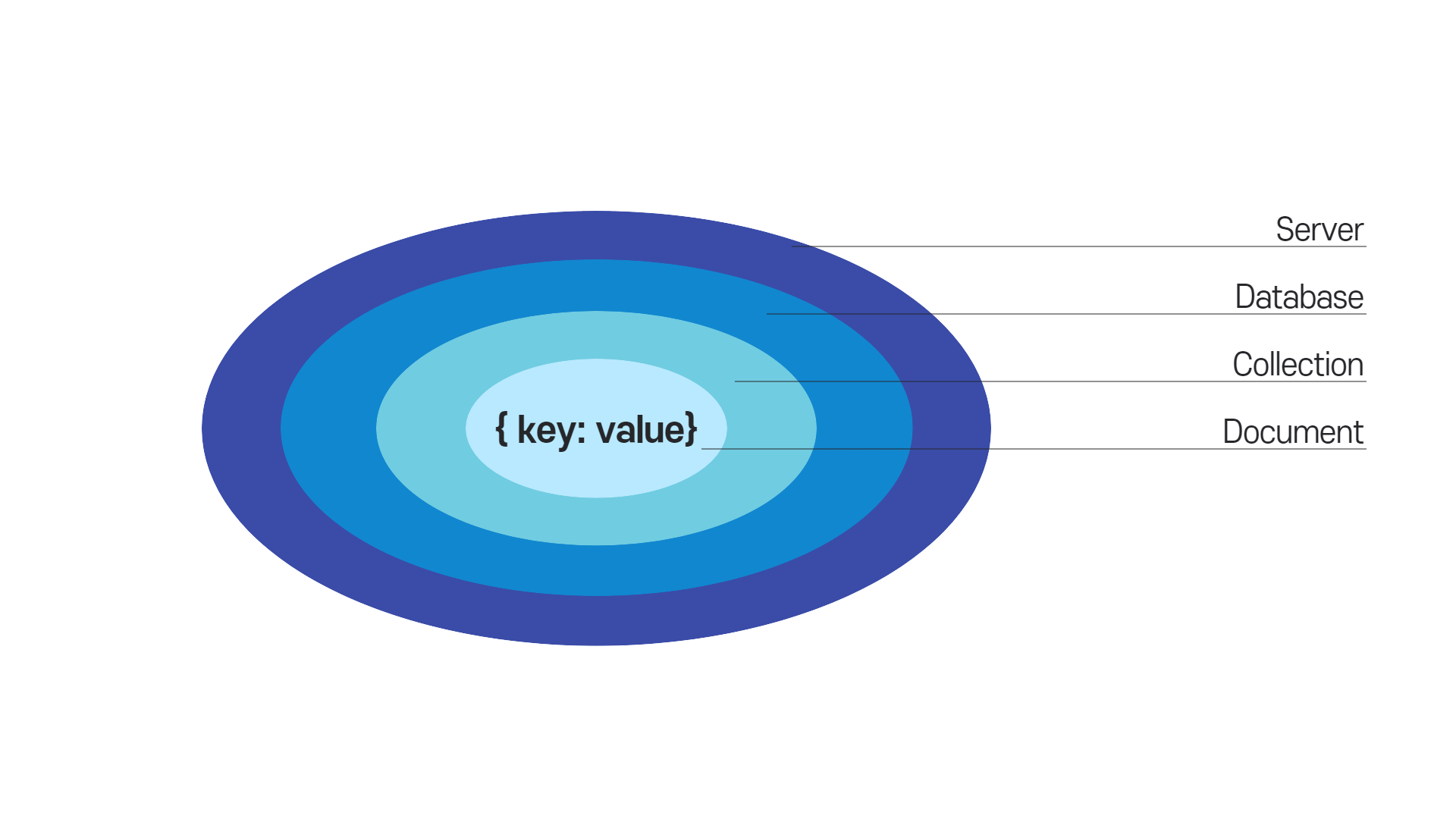
- Database 생성 : use
- use DATABASE_NAME 명령어를 통해 Database를 생성할 수 있다. 만약 데이터베이스가 이미 존재하면 현존하는 데이터베이스를 사용한다.
- 생성 후에 생성된 데이터베이스를 사용하게 된다.
ex) mongodb_tutorial이라는 데이터베이스를 생성한다.
> use mongodb_tutorial
switched to db mongodb_tutorial
ex) 현재 사용 중인 데이터베이스를 확인하려면 db명령어를 입력한다.
> db
mongodb_tutorial
ex) 만든 데이터베이스 리스트들을 확인하려면 show dbs명령어를 입력한다.
> show dbs
local  0.000GB
리스트에서 방금 만든 데이터베이스를 보려면 최소 한 개의 Document를 추가해야 한다.
> db.book.**insert**({"name": "MongoDB Tutorial", "author": "velopert"});

WriteResult({ "nInserted" : 1 })
> **show dbs**
local             0.000GB
mongodb_tutorial 0.000GB- Database 제거 : db.dropDatabase()
- db.dropDatabase() 명령어를 통해 Database를 제거한다.
- 이 명령어를 사용하기 전 use DATABASE_NAME으로 삭제하고자 하는 데이터베이스를 선택해주어야 한다.
EX) mongodb_tutorial 데이터베이스를 제거한다.
> **use mongodb_tutorial**
switched to db mongodb_tutorial
> **db.dropDatabase();**
{ "dropped" : "mongodb_tutorial", "ok" : 1 }- Collection 생성: db.createCollection()
- db.createCollection(name, [options]) 명령어를 통해 Collection를 생성한다. option은 document 타입으로 구성된 해당 collection의 설정값이다. option:
Field Type explanation capped Boolean 이 값을 true로 설정하면 capped collection을 활성화시킨다. Capped Collection이란→ 고정된 크기(fixed size)를 가진 컬렉션으로 size가 초과되면 가장 오래된 데이터를 덮어쓴다. 이 값을 true로 설정하면 size 값을 꼭 설정해야 한다. autoIndex Boolean 이 값을 true로 설정하면, _id 필드에 index를 자동으로 생성한다. 기본값은 false이다. size number Capped collection을 위해 해당 컬렉션의 최대 사이즈(maximum size)를 bytes로 지정한다. max number 해당 컬렉션에 추가할 수 있는 최대 개수를 설정한다. - 선택적인 매개변수로 필요에 따라 사용하면 된다.
- name은 생성하려는 collection의 이름이다.
EX) test 데이터베이스에 books 컬렉션을 옵션 없이 생성한다.
> use test
switched to db test
> db.**createCollection**("books")
{ "ok" : 1 }
EX) test 데이터베이스에 articles 컬렉션을 옵션과 함께 생성한다.
> db.**createCollection**("articles", {
... capped: true,
... autoIndex: true, -> **autoIndexId이다.**
... size: 6142800,
... max: 10000
... })
{ "ok" : 1 }
EX) 따로 createCollection()메서드를 사용하지 않아도 document를 추가하면 자동으로 collection이 생성된다.
> **db.people.insert**({"name": "velopert"})
WriteResult({ "nInserted" : 1 })
만든 collection 리스트들 확인하려면 show collections 명령어 입력한다.
> **show collections**
articles
books
people- Collection 제거: db.COLLECTION_NAME.drop()
- drop() 메소드를 통해 Collection을 제거할 수 있다.
- 명령어를 사용하기 전에 사용할 데이터를 우선 설정해야 한다.
EX) test 데이터베이스의 people컬렉션을 제거한다.
> use test
switched to db test
> show collections
articles
books
people
> db.people.**drop()**
true
> show collections
articles
books- Document 추가 : db.COLLECTION_NAME.insert(document)
- insert() 메서드를 통해서 Document를 추가할 수 있다. 배열 형식의 인자를 전달해주면 여러 document를 동시에 추가할 수 있다.
- 이 명령어를 사용하기 전에 데이터를 추가할 데이터베이스를 선택해야 한다.
EX) 한 개의 document를 books 컬렉션에 추가한다.
> db.books.insert({"name": "NodeJS Guide", "author": "Velopert"})
WriteResult({ "nInserted" : 1 })
EX) 두 개의 document를 books 컬렉션에 추가한다.
> db.books.insert([
... {"name": "Book1", "author": "Velopert"},
... {"name": "Book2", "author": "Velopert"}
... ]);
BulkWriteResult({
        "writeErrors" : [ ],
        "writeConcernErrors" : [ ],
        "nInserted" : 2,
        "nUpserted" : 0,
        "nMatched" : 0,
        "nModified" : 0,
        "nRemoved" : 0,
        "upserted" : [ ]
})
collection의 document 리스트를 확인할 때는 db.COLLECTION_NAME.find() 명령어를 사용한다.
> db.books.find()
{ "_id" : ObjectId("56c08f3a4d6b67aafdeb88a3"), "name" : "MongoDB Guide", "author" : "Velopert" }
{ "_id" : ObjectId("56c08f474d6b67aafdeb88a4"), "name" : "NodeJS Guide", "author" : "Velopert" }
{ "_id" : ObjectId("56c0903d4d6b67aafdeb88a5"), "name" : "Book1", "author" : "Velopert" }
{ "_id" : ObjectId("56c0903d4d6b67aafdeb88a6"), "name" : "Book2", "author" : "Velopert" }- Document 제거 : db.COLLECTION_NAME.remove(criteria, justOne)
- remove(criteria, justOne) 메서드를 통해 Document를 제거할 수 있다.
parameter type explanation criteria document 삭제할 데이터의 기준 값(criteria)이다. 이 값이 { }이면 collection의 모든 데이터를 제거한다. justOne boolean 선택적(Optional) 매개변수이며 이 값이 true이면 1개의 document만 제거한다. 이 매개변수가 생략되면 기본 값은 false로서 criteria에 해당되는 모든 document를 제거한다. - 매개변수:
EX) books 컬렉션에서 "name"이 "Book 1"인 document를 제거한다.
> db.books.find({"name": "Book1"})
{ "_id" : ObjectId("56c097f94d6b67aafdeb88ac"), "name" : "Book1", "author" : "Velopert" }
> db.books.**remove**({"name": "Book1"})
WriteResult({ "nRemoved" : 1 })
> db.books.find()
{ "_id" : ObjectId("56c08f3a4d6b67aafdeb88a3"), "name" : "MongoDB Guide", "author" : "Velopert" }
{ "_id" : ObjectId("56c08f474d6b67aafdeb88a4"), "name" : "NodeJS Guide", "author" : "Velopert" }
{ "_id" : ObjectId("56c097f94d6b67aafdeb88ad"), "name" : "Book2", "author" : "Velopert" }
참고한 사이트 :
[MongoDB] 강좌 목록 | VELOPERT.LOG
velopert.com
728x90
반응형
'Database > MongoDB' 카테고리의 다른 글
| MongoDB - 배열 쿼리 - (1) (1) | 2021.12.19 |
|---|---|
| MongoDB - Document Query(조회) - (2) (2) | 2021.12.18 |
| MongoDB - Document Query(조회) - (1) (0) | 2021.12.18 |
| MongoDB - 데이터 모델링 (1) | 2021.12.18 |
| MongoDB 소개, 설치 (0) | 2021.12.17 |